
Connect
Bring your nutrition into Claude & ChatGPT.
Connect traq.food to the assistant you already use, and it can read your meals and goals, log what you ate from a sentence, and tell you how your week is going — all on your behalf, all in your control.
Closed beta. Connecting an assistant is rolling out to paying users and active beta testers first, while we finish billing. If your account isn’t enabled yet, the connection is politely declined — email support@traq.food (or request access from the traq.food iOS app under More → Agent Tokens) and we’ll get you in. Once you’re enabled, the steps below just work.
Choose your assistant
Claude
Add traq.food as a custom connector in Claude’s settings. Available on Free, Pro, Max, Team, and Enterprise — on the web and the desktop app.
Connect Claude ↓ChatGPT
Add traq.food as an app in ChatGPT’s Developer Mode. Available on Plus, Pro, Business, Enterprise, and Edu — on the web.
Connect ChatGPT ↓Claude
Connect traq.food to Claude
Takes about a minute. You’ll paste one address, sign in with Google, and approve the connection. No token to copy, nothing to configure.
-
Open Claude’s connector settings
In Claude, go to Settings›Customize›Connectors. On a Team or Enterprise plan your workspace owner adds it once under Organization settings › Connectors; then you’ll just see a Connect button here.
-
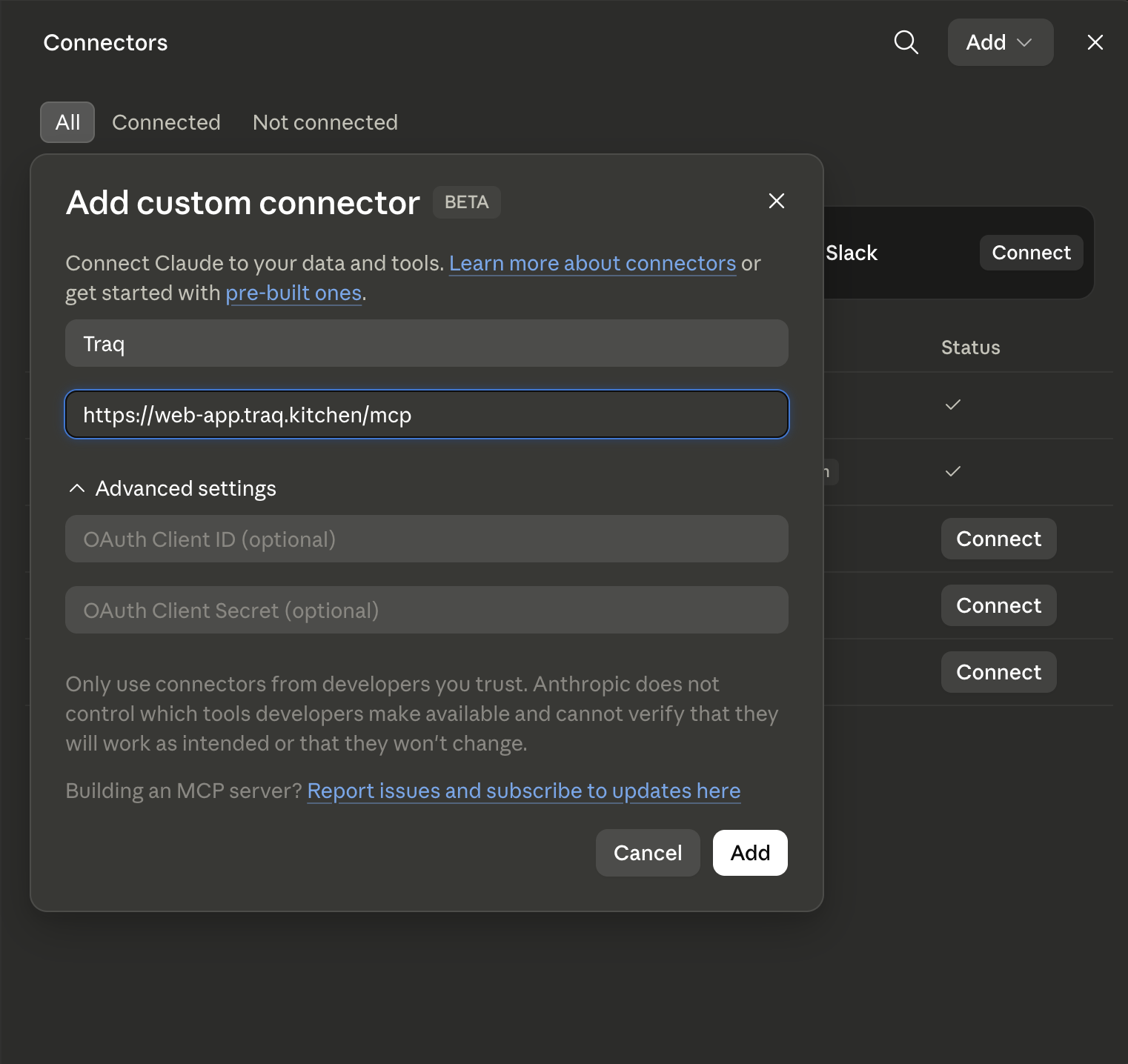
Add a custom connector
Click +, then Add custom connector. Name it traq.food and paste the server address:
https://web-app.traq.kitchen/mcpLeave the advanced fields empty — it handles sign-in for you. Click Add.
-
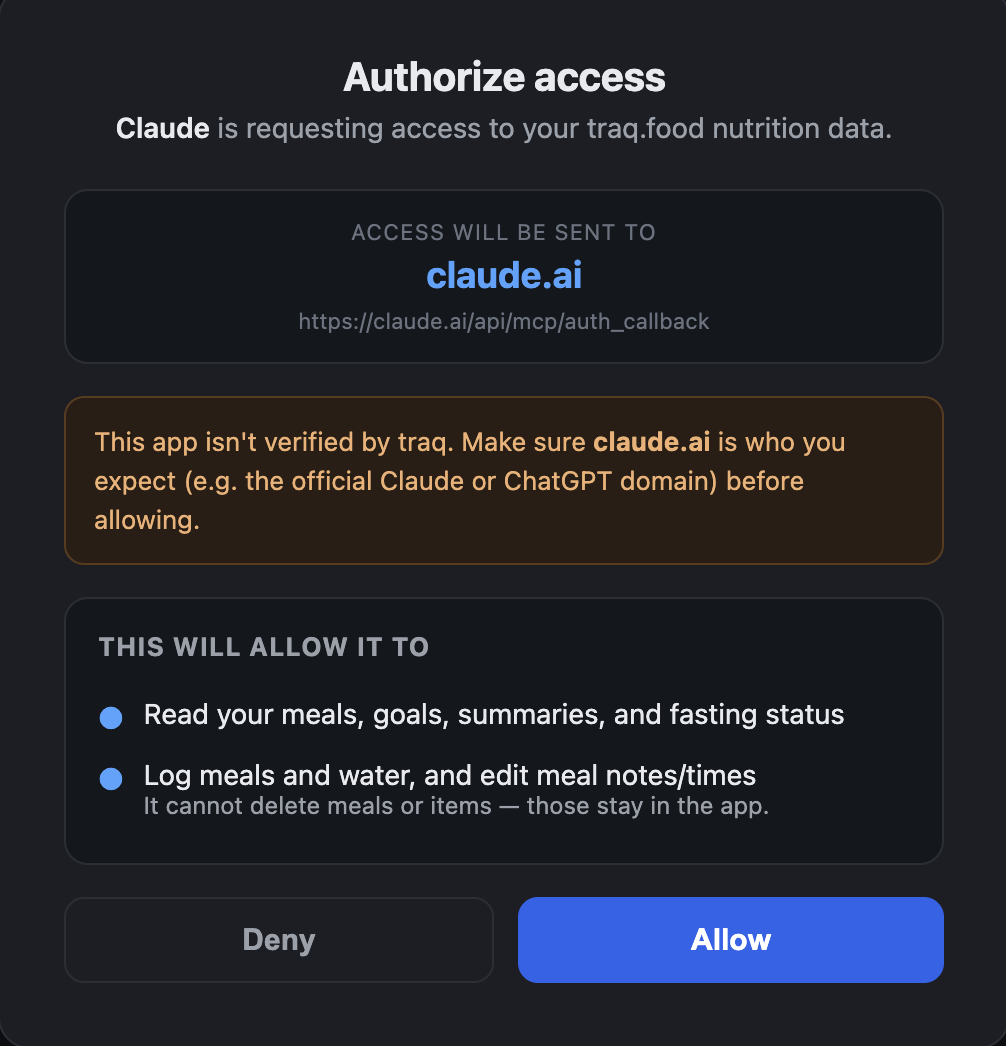
Sign in & approve on traq.food’s screen
Claude sends you to our sign-in page. Sign in with Google, review what Claude is asking for, and click Allow. You land back in Claude, connected.
-
Turn it on in a chat & try it
In any conversation, click the + button, choose Connectors, and enable traq.food. Then ask: "What did I eat today?"
ChatGPT
Connect traq.food to ChatGPT
ChatGPT puts custom connections behind Developer Mode. You’ll switch it on once, add traq.food, and approve the connection with your traq.food account.
-
Turn on Developer Mode
In ChatGPT on the web, go to Settings›Apps›Advanced and enable Developer mode. (Available on Plus, Pro, Business, Enterprise, and Edu accounts.)
-
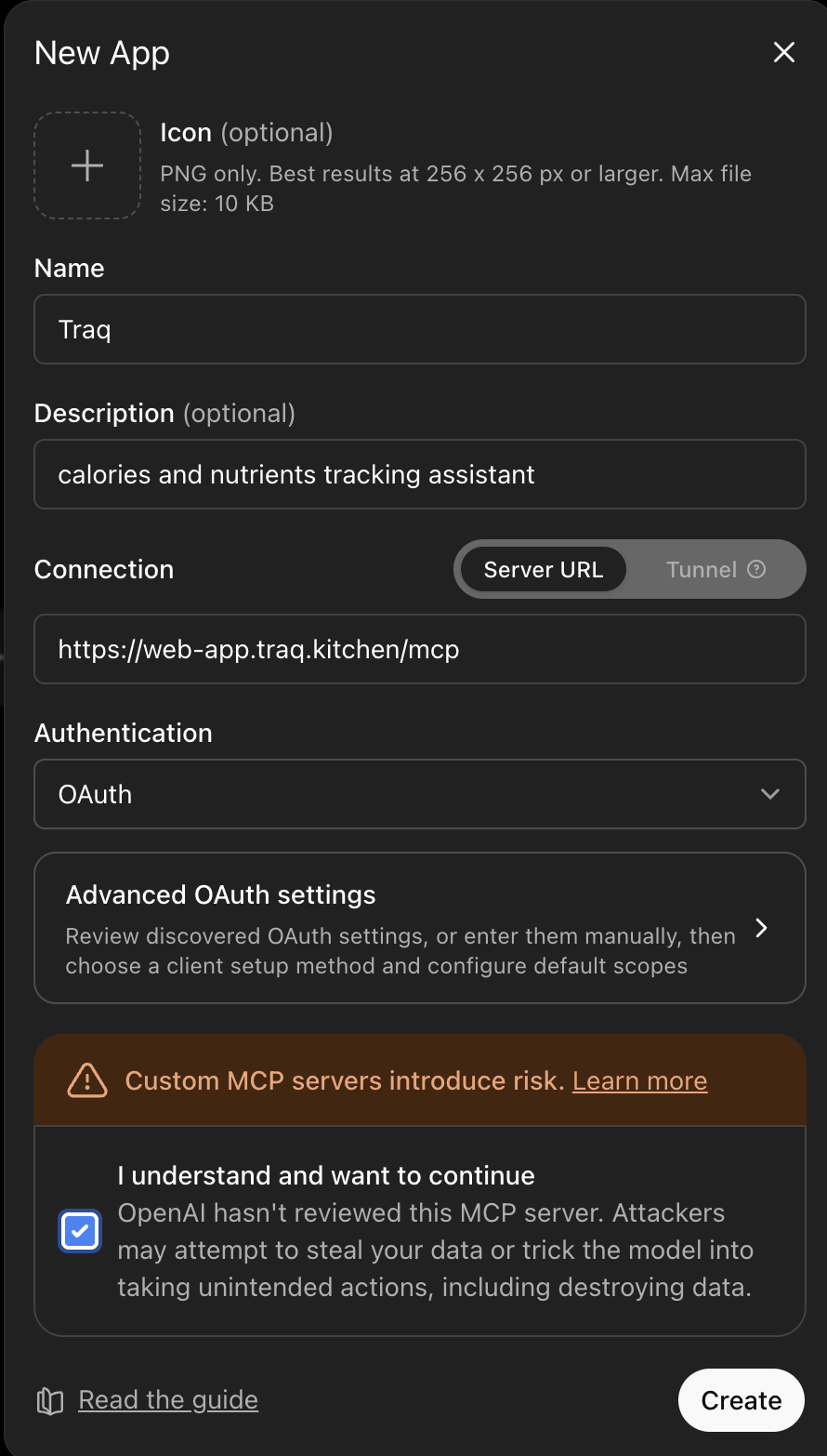
Add traq.food as an app
Still in Apps, choose Create to add a custom app for a remote server. Name it traq.food and paste the server address:
https://web-app.traq.kitchen/mcpFor authentication, choose OAuth — it manages sign-in. Save.
-
Sign in & approve on traq.food’s screen
ChatGPT opens our sign-in page. Sign in with Google, review the request, and click Allow — the same approval screen described above.
-
Use it in a chat
Open the tools in the message box, enable the traq.food app under Developer Mode, and ask: "Log a flat white and tell me my calories left today."
Once connected
Just talk to it. It does the rest.
Your assistant can read your data and log new meals on your behalf. Ask in plain language — here are some starting points.
Ask about your data
- What did I eat today, and how much protein is left?
- How did my week go against my calorie goal?
- What’s my current fasting streak?
- Am I getting enough fiber lately?
- Summarize my eating for the last 30 days.
Log & adjust by chatting
- Log a black coffee and two scrambled eggs.
- I had a chicken burrito for lunch — about 600 calories.
- Add a glass of water.
- Change my 1pm meal to 12:30.
- Rename yesterday’s dinner to "leftover pasta."
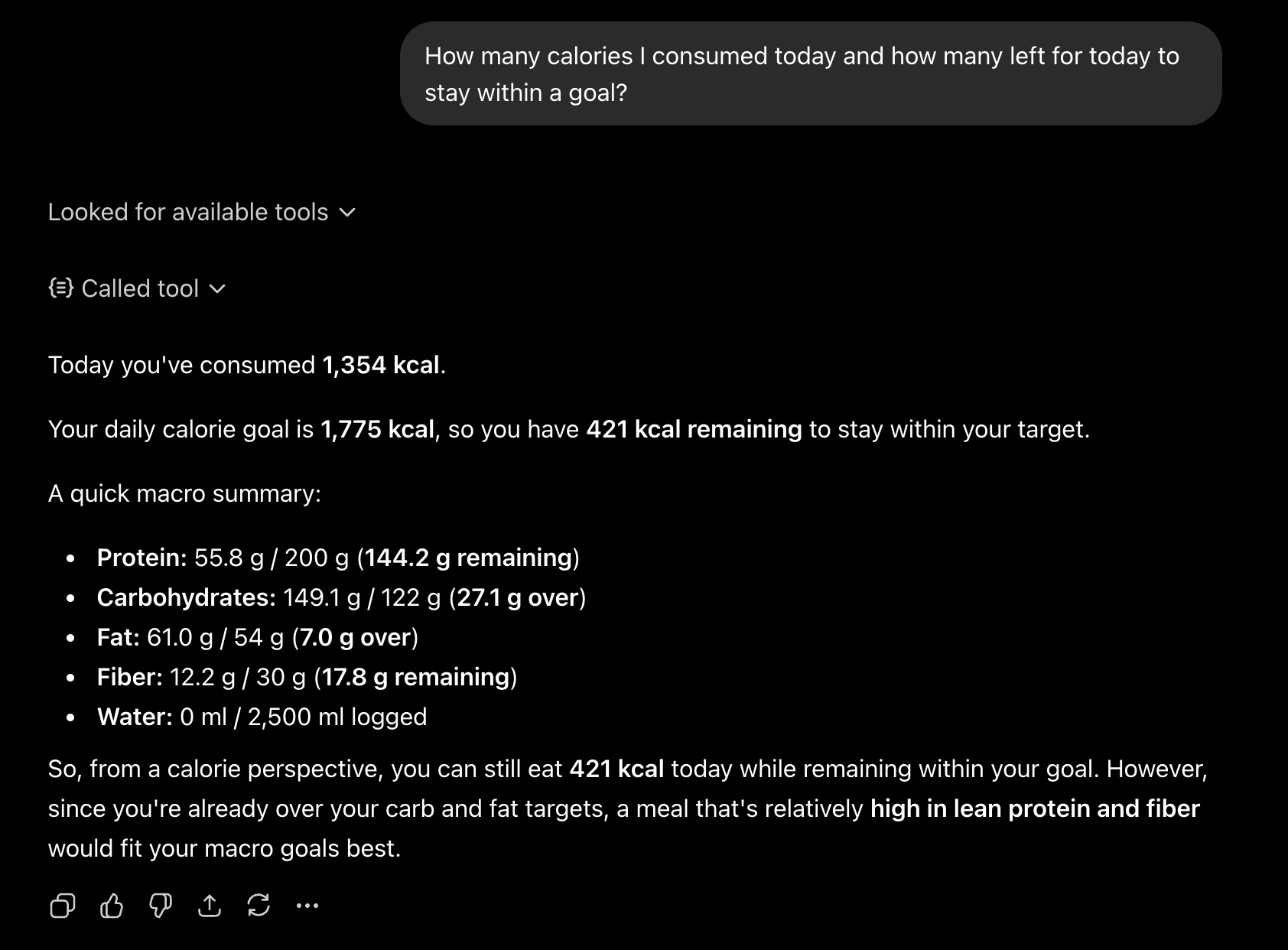
It works the way it should: the assistant decides when it has enough detail and asks you when it doesn’t. Anything it logs shows up in the iOS app right away, and you can edit or delete it there as usual.
Safety & control
You decide what your assistant can see — and you can take it back.
You approve every connection
Nothing connects silently. You sign in on a traq.food page and explicitly allow it, after seeing where the data goes and what it can do.
Read and write, never delete
Assistants can read your data and add meals or water. They cannot delete meals or items — destructive changes stay in the app, with you.
Your data stays yours
An assistant only ever sees your own nutrition data, and only the parts it needs to answer. The connection carries no password — and it can’t create new access on its own.
Revoke in one step
Remove the connector in Claude or ChatGPT to cut it off instantly. The next request stops working immediately.
The same privacy promises from the app apply here. Read our privacy policy →
Good to know
Questions & troubleshooting.
I’m not enabled for the beta yet — how do I get access?
Connecting an assistant is in closed beta — we’re enabling paying users and active beta testers first while billing is finished. If your account isn’t enabled, approving the connection sends you back to Claude or ChatGPT with an "access denied" message (nothing breaks — you just can’t connect yet).
To get on the list, email support@traq.food, or open the traq.food iOS app and go to More → Agent Tokens → Request access. Once we enable your account, run the connect steps again.
Do I need to copy a token or API key?
No. For Claude and ChatGPT you only paste the server address and sign in — traq.food handles the rest. (If you’re a developer wiring traq.food into your own scripts or the Claude Code CLI, there’s a token-based path in the developer section below.)
Which sign-in should I use?
Connecting an assistant currently uses Sign in with Google. It connects to your traq.food account, so your meals and goals are exactly what you see on your phone.
If you set up traq.food with Apple, Sign in with Apple for connectors isn’t available just yet — email support@traq.food and we’ll help you connect in the meantime.
Can the assistant delete my meals or mess up my data?
It can read your data and add meals, water, or notes — but it cannot delete anything. If it logs something you didn’t want, just delete it in the app like any other entry. Deletion is deliberately kept out of an assistant’s reach.
How do I disconnect it?
Remove the traq.food connector from Claude’s Connectors settings or ChatGPT’s Apps settings. Access stops on the very next request. You can reconnect anytime by repeating the steps.
It says the connection failed, or "access denied."
A few things to check:
- Make sure you finished the Allow step on the traq.food page — closing it early leaves the connection half-set. Remove the connector and add it again.
- If you’re a beta tester whose app shows an orange STAGING banner, your account lives on the staging server — use
https://web-app-staging.traq.kitchen/mcpinstead. - "Access denied" usually means your account isn’t enabled for the beta yet — see "I’m not enabled for the beta yet" above for how to request access.
Will this use up my traq.food usage?
There are gentle per-minute and daily limits so an assistant can’t run away with requests. Normal use won’t hit them; if it does, you’ll see a "rate limit" message and it clears on its own shortly after.
For developers
Prefer the CLI or your own agent? traq.food’s MCP server also accepts a personal access token.
Token-based setup (Claude Code, APIs, custom agents)
1. Mint a token in the app
Open More → Agent Tokens → New Token in the iOS app, name it, and pick read and/or write scopes. The token is shown once — copy it. (Token creation is gated by the same closed beta.)
2. Claude Code (CLI)
claude mcp add --transport http traq \
  https://web-app.traq.kitchen/mcp \
  --header "Authorization: Bearer traq_YourTokenHere"
3. Anthropic Messages API
mcp_servers=[{
    "type": "url",
    "url": "https://web-app.traq.kitchen/mcp",
    "name": "traq",
    "authorization_token": "traq_YourTokenHere",
}]
# requires beta header: anthropic-beta: mcp-client-2025-11-20
4. OpenAI Responses API
tools=[{
    "type": "mcp",
    "server_label": "traq",
    "server_url": "https://web-app.traq.kitchen/mcp",
    "authorization": "traq_YourTokenHere",
    "require_approval": "never",
}]
Tools, resources & limits
Read (read scope): list_meals, get_meal, search_meals, get_daily_summary, get_period_summary, get_goal_adherence, get_fasting_status, get_goals, get_insights. Write (write scope): log_meal, log_water, update_meal_notes, update_meal_time, log_meal_from_text. Resources: traq://today, traq://goals, traq://meals/recent, traq://fasting. Deleting meals or items is intentionally not exposed.
Rate limits per token: 30/min reads, 10/min writes, 5/min for the two LLM-backed tools (get_insights, log_meal_from_text), and 300/day total. A 429 names the limit it hit. Every call is recorded in an audit log (no PII); tokens are revocable instantly from the app.
Questions, higher limits, or partner access? Email support@traq.food.
Not on traq.food yet?
traq.food is in private beta on TestFlight. Join the list, start tracking, and connect Claude or ChatGPT once you’re in.
Free during beta · iOS 18.0 or later · iPhone only