Snap it. Say it.
Scan it. Traq it.
traq.food is a nutrition tracker for iPhone. Snap a photo, speak a sentence, or scan a barcode — and when it gets something wrong, just tell it.

How it works
Three ways in. One source of truth.
Most trackers offer a search box. We don't. You log a meal the way it actually happens — by photo, by sentence, or by scan — and the rest is the app's problem.
Snap a photo. Get full nutrition.
Identifies every item on your plate, estimates portions, and gives you the full nutrition breakdown. From a single photo.

Just say what you ate.
A conversational assistant understands plain language. Type or speak — "I had eggs and toast", "yesterday at 8pm a slice of pizza" — and the meal lands on the right day, on the right plate, with the right macros. The mic in the chat works hands-free for when you're cooking.

Scan a barcode. Instant lookup.
Point the camera at any barcode and get a full nutrition card immediately. No typing, no searching, no second-guessing the database row.

There's also a one-tap water button — long-press for other sizes — with an opt-in reminder if you're falling behind on your hydration goal.
When it misreads an item
Don't delete it. Talk to it.
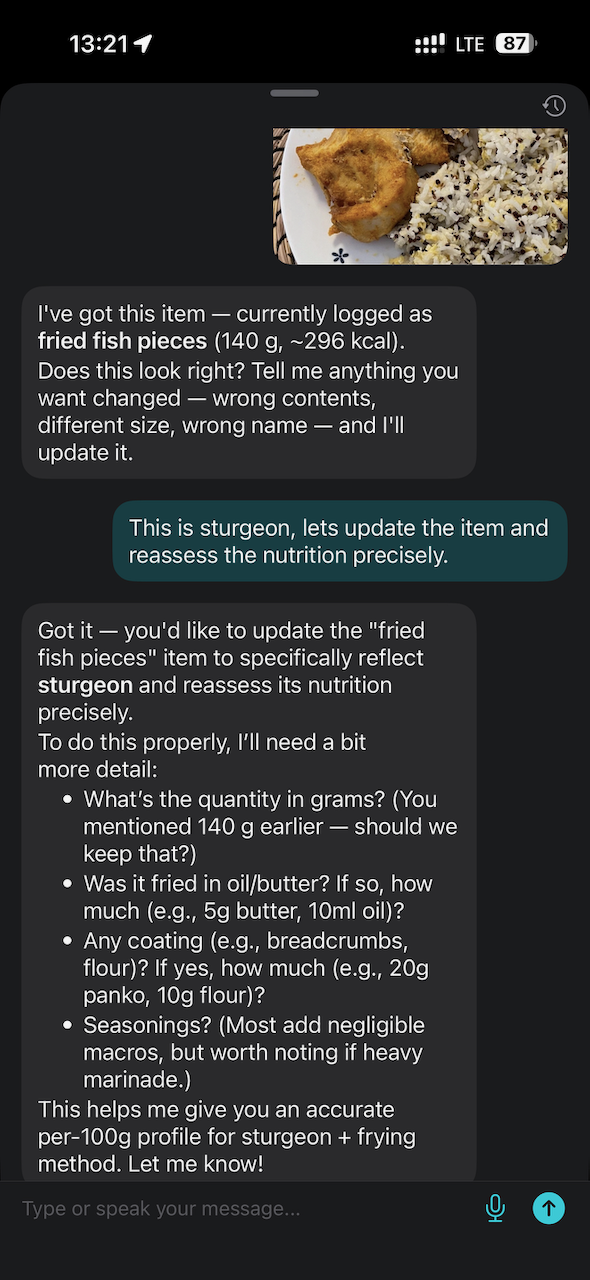
Every other photo tracker leaves you stuck when it mislabels an item — delete the meal, log it again from scratch. Not here. Tap any item in your meal and you're in a conversation about that specific item. The assistant already knows what it currently thinks the item is, and what the photo of it looks like. Tell it what's wrong in plain language:
- "That's a chicken wrap, not a tortilla." — it re-analyzes that item and updates it.
- "Make it 200 g, plus a tablespoon of olive oil." — direct edit, macros recalculate.
- "Rename it to 'lunch wrap'." — done.
Chain corrections in one conversation. The macros, the photo annotation, the calorie total — everything updates as you go. And there are quick shortcuts for the common fixes: swap an item, add one it missed, or redraw the region you want re-analyzed.
Accuracy
traq.food does the boring part. Then checks itself.
Most photo-logging apps run a single classifier and call it done. We don't. Our pipeline is multi-stage and self-checking — when the calorie estimate looks off against the photo, the pipeline re-examines the image before committing the result. And when you spot something it missed, correcting it takes one sentence.


Patterns
What your eating actually looks like, written in plain English.
Open the assistant and the first thing you see is a Daily Insight — a short, personalized read on yesterday's eating, what's drifting and what's working, with concrete suggestions you can follow up on.
Want a deeper read? Pick any window from a week to a year and the app generates a multi-paragraph review of how your meals and fasting are tracking against your goals. Sentences, not graphs. Plus how often you hit each goal, and your current and longest streak.
New · Connect
Now it works inside Claude & ChatGPT.
Connect traq.food to the assistant you already use, and just talk to it. “What did I eat today?” “Log a coffee and two eggs.” “How did my week go against my goal?” — it reads your meals and logs new ones on your behalf, right from the chat.
You approve every connection and can revoke it in one step. Assistants can read your data and add meals — but never delete anything. That stays in the app, with you.
Rolling out to paying users and beta testers first.

Goals & energy
Targets you can actually express.
Six nutrients, three directions each
Calories, protein, carbs, fat, fiber, water — each one can be at least, at most, or a target. So fiber can be "at least 30 g" while calories is "at most 2000". Protein supports per-kg body-weight scaling, so it stays right when your weight changes.
Energy balance, in plain numbers
Today's net — what you ate minus what you burned — and a target you set yourself. Whether you're cutting, bulking, or just maintaining, the app shows you whether you're tracking against it.
Apple Health, both directions
Reads your active and resting energy expenditure straight from HealthKit; writes the nutrition you log back to it. One source of truth across the Apple ecosystem, no manual entry on either side.
Outside the app
Your fasting timer, one glance away.
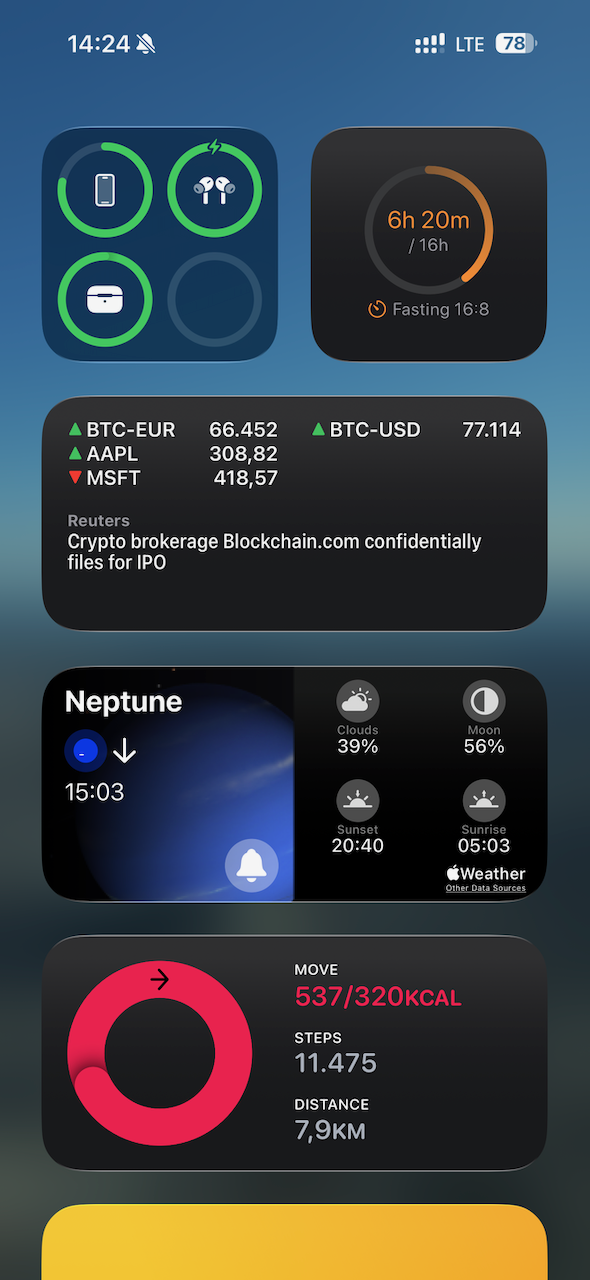
Intermittent fasting is built in — pick a ratio (14:10, 16:8, 18:6, 20:4) or set a feeding window. Lock Screen and Home Screen widgets keep the timer one glance away, no app launch required. The widget turns green the moment you hit your fasting goal.
Privacy
Your data, never anyone else's product.
Photo analysis and chat run on trusted cloud AI providers (AWS, Alibaba Cloud), used only to recognize your food — those providers don't train their own models on your data. We may use beta usage data to improve traq.food's own food-recognition accuracy. Your data is never sold, never shared with advertisers or data brokers, and never used for ad targeting. Sign out and the device forgets you locally; delete your account and the server forgets you too, after a 30-day cancellation window.
Read our privacy policy →Built in
And more.
-
Calendar with goal dots
Every day in the calendar shows a status dot per goal so you can see your adherence at a glance and drill into any single day.
-
Smart push notifications
Opt-in meal reminders that aren't spam, plus a ping the moment a photo finishes analyzing so you can tap straight to the result.
-
Hands-free voice input
The mic in the chat works while you cook. Speak, log, move on.
-
Works offline
Photos queue locally and process the moment you reconnect.
FAQ
Questions, answered.
-
How does traq.food log food?
traq.food logs food three ways: snap a photo to get full nutrition, say what you ate by voice, or scan a barcode for an instant lookup.
-
What if a food item comes back wrong?
Instead of deleting the entry, you tell the assistant what is wrong and it re-analyses that item. No re-logging, no starting over.
-
Does traq.food sync with Apple Health?
Yes. traq.food syncs both directions with Apple Health.
-
Is traq.food available now?
traq.food is in early-access private beta on TestFlight — free during beta, for iPhone on iOS 18 or later. Request an invite at traq.food.
Start tracking in seconds.
traq.food is in private beta on TestFlight. Join the list and we'll send you access. Pricing for the public release will be announced before it ships — no surprise paywalls.
Free during beta · iOS 18.0 or later · iPhone only